
Subnet Cheat Sheet – 24 Subnet Mask, 30, 26, 27, 29, and other IP Address CIDR Network
Subnetting & CIDR Cheat Sheet: A Practical Guide for Network Engineers and Developers
Quick Reference: Need the subnet table now? Jump to CIDR Reference Tables ↓
Understanding subnet masks and CIDR notation isn’t just for CCNA candidates—it’s essential for cloud architects designing VPCs, DevOps engineers configuring Kubernetes pods, and developers debugging network connectivity. This guide cuts through theory with actionable knowledge you’ll use daily.
Table of Contents
🔑 Core Concepts in 60 Seconds
| Term | What It Means | Real-World Analogy |
|---|---|---|
| Subnet Mask | Filter that separates network vs. host bits in an IP address | ZIP code separating city (network) from street address (host) |
| CIDR Notation | Shorthand for subnet masks (/24 = 255.255.255.0) | “First 24 digits define the neighborhood” |
| Wildcard Mask | Inverse of subnet mask (used in ACLs/routing) | “These bits can vary” |
| Usable IPs | Total IPs minus network/broadcast addresses | Hotel rooms minus lobby & maintenance closet |
💡 Pro Insight: In cloud environments (Azure VNets, AWS VPCs),
/31and/32subnets are common for point-to-point links and single-host allocations—no broadcast address needed in virtual networks.
🧮 How Subnet Masks Actually Work (With Binary)
Every IPv4 address is 32 bits split into 4 octets. A subnet mask uses 1s to mark network bits and 0s for host bits.
Example: 192.168.1.50/26
IP Address:    11000000.10101000.00000001.00110010  (192.168.1.50)
Subnet Mask:   11111111.11111111.11111111.11000000  (255.255.255.192)
               └────────── Network ──────────┘└Host┘
- Network ID:
192.168.1.0(first 26 bits fixed) - Usable Range:
192.168.1.1–192.168.1.62 - Broadcast:
192.168.1.63
For example, here’s what the IP address 172.16.254.1 looks like in binary:

To convert an IP address between its decimal and binary forms, you can use this chart:
| 128 | 64 | 32 | 16 | 8 | 4 | 2 | 1 |
| x | x | x | x | x | x | x | x |
The chart above represents one 8 bit octive.
Now lets say you want to convert the IP address 168.210.225.206. All you need to do is break the address into four blocks (168, 210, 225, and 206), and convert each into binary using the chart above.
Remember that in binary, 1 is the equivalent to “on” and 0 is “off”. So to convert the first block, 168, into binary, just start from the beginning of the chart and place a 1 or 0 in that cell until you get a sum of 168.
For example:
| 128 | 64 | 32 | 16 | 8 | 4 | 2 | 1 |
| 1 | 0 | 1 | 0 | 1 | 0 | 0 | 0 |
128 + 32 + 8 = 168, which in binary is 10101000.
If you do this for the rest of the blocks, you’d get 10101000.11010010.11100001.11001110.
⚠️ Critical Gotcha:
/31subnets (RFC 3021) have no network/broadcast addresses—both IPs are usable for point-to-point links (common in cloud routing).
📊 CIDR Reference Tables (Optimized for Cloud Workloads)
Quick-Reference CIDR Table
| CIDR | Subnet Mask | Wildcard Mask | Total IPs | Usable IPs | Typical Use Case |
|---|---|---|---|---|---|
| /32 | 255.255.255.255 | 0.0.0.0 | 1 | 1 | Single host (Azure NSG rule) |
| /31 | 255.255.255.254 | 0.0.0.1 | 2 | 2* | Point-to-point links (cloud routers) |
| /30 | 255.255.255.252 | 0.0.0.3 | 4 | 2 | Small WAN links |
| /29 | 255.255.255.248 | 0.0.0.7 | 8 | 6 | Small office networks |
| /28 | 255.255.255.240 | 0.0.0.15 | 16 | 14 | Azure Bastion subnet |
| /27 | 255.255.255.224 | 0.0.0.31 | 32 | 30 | Small app tiers |
| /26 | 255.255.255.192 | 0.0.0.63 | 64 | 62 | Medium app tiers |
| /24 | 255.255.255.0 | 0.0.0.255 | 256 | 254 | Standard VLAN / small VPC subnet |
| /23 | 255.255.254.0 | 0.0.1.255 | 512 | 510 | Medium VPC subnet |
| /22 | 255.255.252.0 | 0.0.3.255 | 1,024 | 1,022 | Large app tier (AWS/Azure) |
| /16 | 255.255.0.0 | 0.0.255.255 | 65,536 | 65,534 | Entire VPC/VNet (e.g., 10.0.0.0/16) |
*
/31usable IPs = 2 (RFC 3021 exception for point-to-point links)
| CIDR | Subnet mask | Wildcard mask | # of IP addresses | # of usable IP addresses |
| /22 | 255.255.252.0 | 0.0.3.255 | 1,024 | 1,022 |
| /21 | 255.255.248.0 | 0.0.7.255 | 2,048 | 2,046 |
| /20 | 255.255.240.0 | 0.0.15.255 | 4,096 | 4,094 |
| /19 | 255.255.224.0 | 0.0.31.255 | 8,192 | 8,190 |
| /18 | 255.255.192.0 | 0.0.63.255 | 16,384 | 16,382 |
| /17 | 255.255.128.0 | 0.0.127.255 | 32,768 | 32,766 |
| /16 | 255.255.0.0 | 0.0.255.255 | 65,536 | 65,534 |
| /15 | 255.254.0.0 | 0.1.255.255 | 131,072 | 131,070 |
| /14 | 255.252.0.0 | 0.3.255.255 | 262,144 | 262,142 |
| /13 | 255.248.0.0 | 0.7.255.255 | 524,288 | 524,286 |
| /12 | 255.240.0.0 | 0.15.255.255 | 1,048,576 | 1,048,574 |
| /11 | 255.224.0.0 | 0.31.255.255 | 2,097,152 | 2,097,150 |
| /10 | 255.192.0.0 | 0.63.255.255 | 4,194,304 | 4,194,302 |
| /9 | 255.128.0.0 | 0.127.255.255 | 8,388,608 | 8,388,606 |
| /8 | 255.0.0.0 | 0.255.255.255 | 16,777,216 | 16,777,214 |
| /7 | 254.0.0.0 | 1.255.255.255 | 33,554,432 | 33,554,430 |
| /6 | 252.0.0.0 | 3.255.255.255 | 67,108,864 | 67,108,862 |
| /5 | 248.0.0.0 | 7.255.255.255 | 134,217,728 | 134,217,726 |
| /4 | 240.0.0.0 | 15.255.255.255 | 268,435,456 | 268,435,454 |
| /3 | 224.0.0.0 | 31.255.255.255 | 536,870,912 | 536,870,910 |
| /2 | 192.0.0.0 | 63.255.255.255 | 1,073,741,824 | 1,073,741,822 |
| /1 | 128.0.0.0 | 127.255.255.255 | 2,147,483,648 | 2,147,483,646 |
| /0 | 0.0.0.0 | 255.255.255.255 | 4,294,967,296 | 4,294,967,294 |
Subnet Mask Binary Reference (Per Octet)
| Decimal | Binary | Wildcard Decimal | Wildcard Binary |
|---|---|---|---|
| 0 | 00000000 | 255 | 11111111 |
| 128 | 10000000 | 127 | 01111111 |
| 192 | 11000000 | 63 | 00111111 |
| 224 | 11100000 | 31 | 00011111 |
| 240 | 11110000 | 15 | 00001111 |
| 248 | 11111000 | 7 | 00000111 |
| 252 | 11111100 | 3 | 00000011 |
| 254 | 11111110 | 1 | 00000001 |
| 255 | 11111111 | 0 | 00000000 |
☁️ Cloud Networking: Subnet Sizing Best Practices
Azure Virtual Networks
# Minimum subnet sizes for Azure services
Azure Bastion:      /27 (30 usable IPs)
Azure Firewall:     /26 (62 usable IPs)
Application Gateway: /28 (14 usable IPs)
AKS Nodes: /24+ (254+ IPs for scaling)AWS VPC Design
# Recommended subnet sizing strategy
Public Subnets (NAT/Gateways): /28
Private App Subnets:           /24
Database Subnets:              /26 (isolated tier)
EKS/K8s Worker Nodes: /22 (for 1000+ pods)💡 Golden Rule: Always reserve 20% of your VPC address space for future expansion. A
/16VPC (10.0.0.0/16) gives you 65k IPs—start with/24subnets to allow room for growth.
⚙️ Practical Tools & CLI Commands
Linux/macOS Subnet Calculations
# Install ipcalc (Debian/Ubuntu)
sudo apt install ipcalc
# Analyze a subnet
ipcalc 10.0.1.0/26
# Output:
# Address:   10.0.1.0
# Netmask:   255.255.255.192 = 26
# Wildcard:  0.0.0.63
# Network:   10.0.1.0/26
# HostMin:   10.0.1.1
# HostMax:   10.0.1.62
# Broadcast: 10.0.1.63
# Hosts/Net: 62PowerShell (Windows)
# Calculate subnet details
Install-Module -Name Subnet
Get-Subnet -IPAddress 192.168.1.50 -PrefixLength 26
# Output usable IP range
192.168.1.1 - 192.168.1.62Python One-Liner
# Calculate number of hosts for any CIDR
cidr = 24
hosts = 2**(32-cidr) - 2  # -2 for network/broadcast
print(f"/{cidr} = {hosts} usable IPs") # Output: /24 = 254 usable IPs🚫 Common Subnetting Mistakes (And How to Avoid Them)
| Mistake | Consequence | Fix |
|---|---|---|
Using /32 for a subnet (not a host route) | Routing failures | /32 = single host; use /30+ for networks |
Forgetting /31 has no broadcast address | BGP sessions fail | Valid for point-to-point links only (RFC 3021) |
| Overlapping subnets in VPC/VNet | Traffic blackholing | Validate with az network vnet check-ip-address |
Using Classful masks (255.0.0.0 for 10.x) | Wasted IP space | Always use VLSM (e.g., 10.0.0.0/24 not /8) |
| Ignoring cloud service minimum sizes | Deployment failures | Azure Firewall requires /26—check docs first |
🔍 Real-World Scenario: Debugging a Connectivity Issue
Problem: App server (10.0.2.15/24) can’t reach database (10.0.3.10/24).
Diagnosis:
# Check routing table
ip route show
# Output: 10.0.2.0/24 dev eth0 → No route to 10.0.3.0/24!
# Verify subnet mask on both hosts
ip addr show eth0 | grep inet
# App: 10.0.2.15/24 → Network: 10.0.2.0
# DB:  10.0.3.10/24 → Network: 10.0.3.0 → Different networks!
# Solution: Add route via gateway OR place in same subnet
ip route add 10.0.3.0/24 via 10.0.2.1
✅ Key Insight: Devices only ARP for hosts in their own subnet. Cross-subnet traffic requires a router/gateway.
💎 Pro Tips You Won’t Find in Textbooks
- Cloud networks ignore broadcast addresses
In AWS/Azure/GCP,/31and/32subnets are fully usable—no reserved broadcast address. - VPC peering requires non-overlapping CIDRs
10.0.0.0/16can’t peer with10.0.1.0/24(overlap). Plan address space early. - Kubernetes needs generous IP space
Each pod gets its own IP. For 100 nodes × 110 pods = 11,000 IPs → minimum/20subnet. - Use RFC 1918 space wisely
   10.0.0.0/8      → Largest block (16M IPs) - enterprise use
   172.16.0.0/12   → Medium (1M IPs) - multi-tenant environments
   192.168.0.0/16  → Smallest (65k IPs) - labs/home networks
- Document your IP schema
Example:
   10.0.0.0/16 VPC
   ├── 10.0.1.0/24   Public subnets (NAT/Gateways)
   ├── 10.0.2.0/24   App tier (EC2/EKS)
   ├── 10.0.3.0/26   Database tier (RDS)
   └── 10.0.255.0/27 Management (Bastion/Jumpbox)
Classful IP Addressing
Now that we’ve gone over some basic examples of subnetting and CIDR, let’s zoom out and look at what’s known as Classful IP addressing.
Back before subnetting was developed, all IP addresses fell into a particular class:
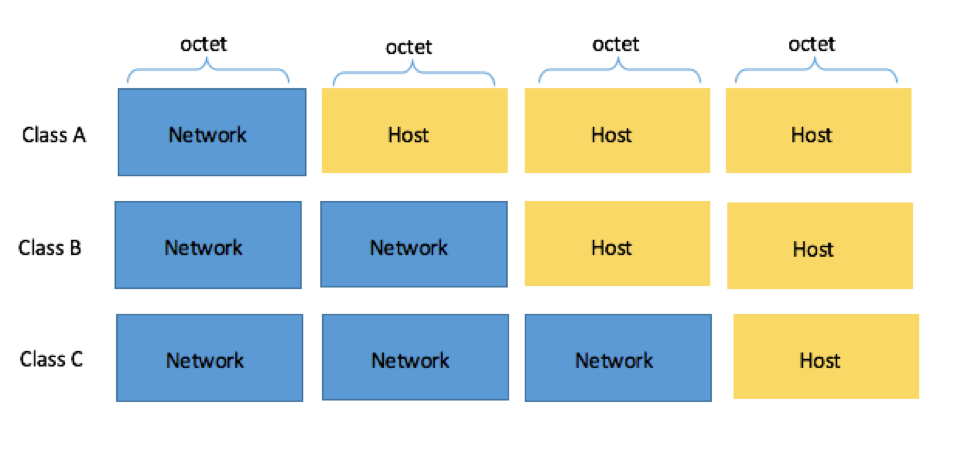
Note that there are class D and E IP addresses, but we’ll go into these in more detail a bit later.
Classful IP addresses gave network engineers a way to provide different organizations with a range of valid IP addresses.
There were a lot of issues with this approach that eventually lead to subnetting. But before we get into those, let’s take a closer look at the different classes.
Class A IP Addresses
For Class A IP addresses, the first octet (8 bits / 1 byte) represent the network ID, and the remaining three octets (24 bits / 3 bytes) are the host ID.
Class A IP addresses range from 1.0.0.0 to 127.255.255.255, with a default mask of 255.0.0.0 (or /8 in CIDR).
This means that Class A addressing can have a total of 128 (27) networks and 16,777,214 (224-2) usable addresses per network.
Also, note that the range 127.0.0.0 to 127.255.255.255 within the Class A range is reserved for host loopback address (see RFC5735).
Class B IP Addresses
For Class B IP addresses, the first two octets (16 bits / 2 bytes) represent the network ID and the remaining two octets (16 bits / 2 bytes) are the host ID.
Class B IP addresses range from 128.0.0.0 to 191.255.255.255, with a default subnet mask of 255.255.0.0 (or /16 in CIDR).
Class B addressing can have 16,384 (214) network addresses and 65,534 (216) usable addresses per network.
Class C IP Addresses
For Class C IP addresses, the first three octets (24 bits / 3 bytes) represent the network ID and the last octet (8 bits / 1 bytes) is the host ID.
Class C IP Addresses range from 192.0.0.0 to 223.255.255.255, with a default subnet mask of 255.255.255.0 (or /24 in CIDR).
Class C translates to 2,097,152 (221) networks and 254 (28-2) usable addresses per network.
Class D and Class E IP Addresses
The last two classes are Class D and Class E.
Class D IP addresses are reserved for multicasts. They occupy the range from 224.0.0.0 through 239.255.255.255.
Class E IP addresses are experimental, and are anything over 240.0.0.0.
The Issue with Classful IP Addresses
The main issue with classful IP addresses is that it wasn’t efficient, and could lead to a lot of wasted IP addresses.
For example, imagine that you’re part of a large organization back then. Your company has 1,000 employees, meaning that it would fall into class B.
But if you look above, you’ll see that a class B network can support up to 65,534 usable addresses. That’s way more than your organization would likely need, even if each employee had multiple devices with a unique address.
And there was no way your organization could fall back to class C – there just wouldn’t be enough usable IP addresses.
So while classful IP addresses were used around the time IPv4 addresses became widespread, it quickly became clear that a better system would be necessary to ensure we wouldn’t use up all of the ~4.2 billion usable addresses.
Classful IP addresses haven’t been used since they were replaced by CIDR in 1993, and are mostly studied to understand early internet architecture, and why subnetting is important.
📚 Further Learning
- RFC 4632: CIDR specification (the official standard)
- RFC 3021:
/31prefix usage for point-to-point links - Azure VNet Planning: Microsoft Docs
- AWS IP Addressing: VPC Best Practices
✅ You now know more than 80% of developers about practical subnetting. Bookmark this page—you’ll reference it during your next cloud architecture review or network troubleshooting session.
Found this useful? Share it with a colleague who’s still converting binary in their head during interviews. 😄